MiniMuse: a creator-focused character studio for visual storytellers
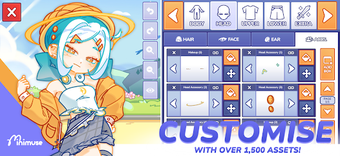
MiniMuse, from Studio Sirenia, is a character-creation and storytelling app that positions players as directors and designers of bespoke "Muses." It pairs an extensive editor with a Studio Mode that places characters in custom scenes, adds props, and attaches dialogue for scene-based storytelling. Key tools include layer reordering, custom palettes, pattern fills, and asset import, aimed at fans of character customization, creative writers, and players who want tight control over visuals.
What kind of tool places you in a storyteller’s chair?
MiniMuse functions as a creative sandbox in the role-playing category, where the player’s goal is to design detailed characters called "Muses" and stage short vignettes. The app emphasizes consequences: whatever appearance and placement choices you make become the scene’s narrative moment, because Studio Mode lets you position characters, add props, and attach dialogue bubbles for directed storytelling.
Does it give precise control over character composition?
The editor supports granular adjustments, with an Advanced Layering System and tools to tweak proportions and asset placement. The wardrobe includes over 1,500 assets covering hair, eyes, limbs, and accessories, and custom palettes and pattern fills let you color each layer. No account is required, so work saves locally and players can start designing immediately without login friction.
How does the interface handle imported art and composition?
The app accepts custom asset import, which lets you use personal images as backgrounds or design elements inside scenes, and the layering UI supports reordering and fine positioning. MiniMuse is available on Android (7.0 and up) and runs on PC through Google Play Games, where the published PC requirements note an SSD with 10 GB free space and at least 8 GB of RAM for desktop use.
What keeps creators returning to the editor?
Replay value comes from community-driven additions and the freedom to combine imported artwork with the built-in wardrobe. The developer maintains active devlogs and social channels, and the app receives regular updates that respond to creator requests. High store ratings and praise for the layering and clothing variety suggest players use the tool repeatedly to refine characters and craft short scenes.
MiniMuse suits makers who enjoy hands-on visual design, with a small caveat
MiniMuse is a practical pick for visual storytellers who enjoy fine-grained character work and iterative scene-building through community feedback. Some users have reported minor issues with character adjustments and pattern behavior, which can interrupt a creative session; players who tolerate occasional quirks in exchange for deep customization will find the app rewarding.